

Sign in
If you do not have an account, click Create AccountCreate Account

Some items are no longer available. Your cart has been updated.
This discount code cannot be used in conjunction with other promotional or discounted offer.
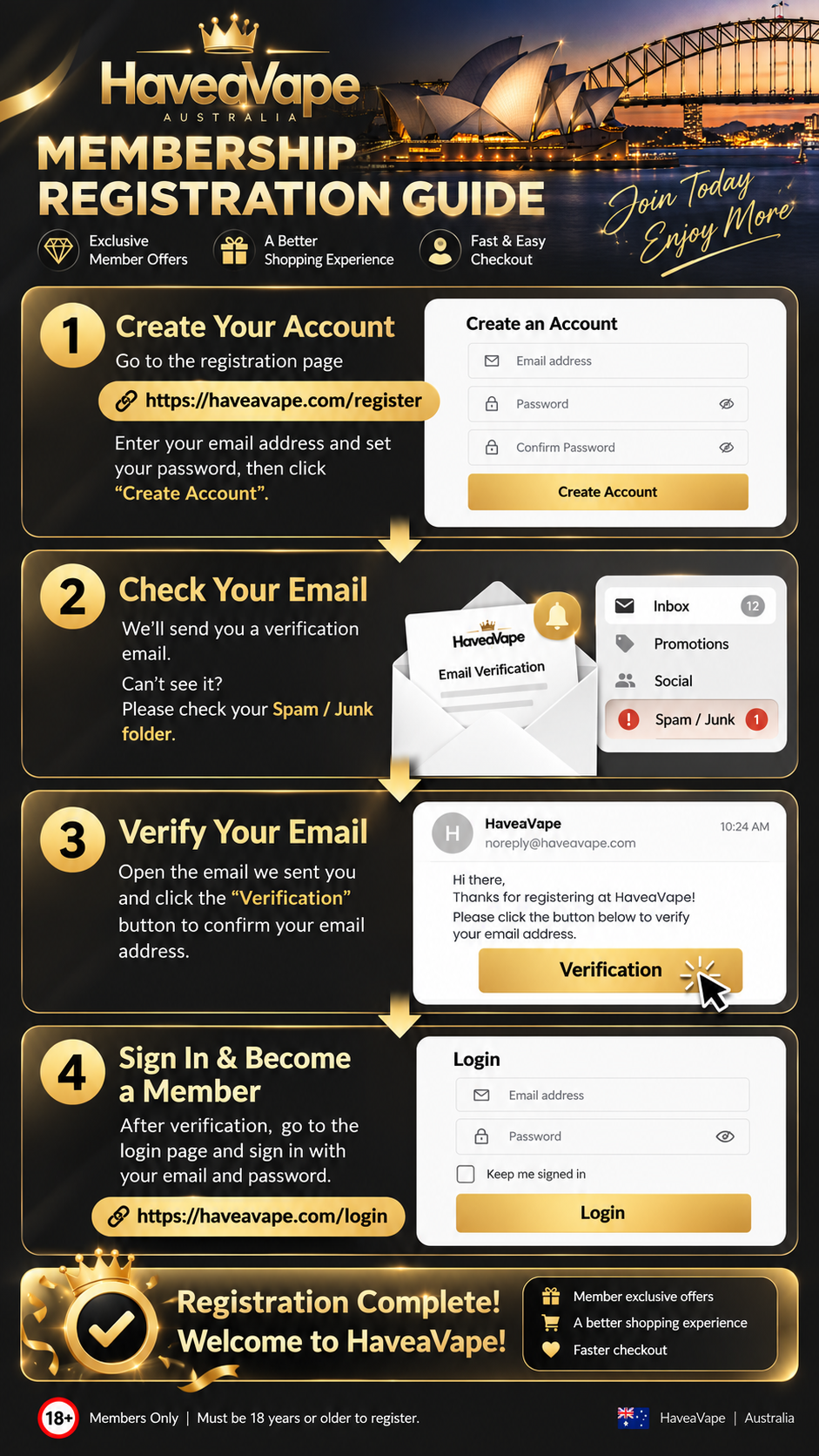 👑 Haveavape Membership Registration Guide
Welcome to Haveavape Australia! 🇦🇺
Join the Haveavape community and enjoy a more convenient shopping experience, exclusive member offers and easier account management.
Creating your membership account is quick and simple. Just follow the four steps below to get started!
First, you'll need to create your personal Haveavape account.
How to register:
Visit our official registration page:
https://haveavape.com/register
Enter your valid email address in the Email Address field.
Create a secure password in the Password field.
Re-enter your password in the Confirm Password field.
Make sure both passwords match.
Click the gold "Create Account" button to submit your registration.
✅ Important Tips:
Use an email address you can access, as you'll need it to verify your account.
Make sure your password is entered correctly.
Keep your login details safe for future use.
You must be 18 years or older to register.
Once your registration has been submitted, please proceed to the next step.
After creating your account, Haveavape will send a verification email to your registered email address.
What to do next:
Open your email inbox.
Look for a verification email from Haveavape.
Open the email to find your account verification instructions.
Can't find our email?
Don't worry! Sometimes verification emails may be automatically filtered into other folders.
Please check:
📥 Inbox — Your main email folder.
📢 Promotions — Especially if you're using Gmail.
🗑️ Spam / Junk — Some email providers may filter automated emails.
💡 Helpful Tip:
Make sure you're checking the same email address you used during registration.
If the email hasn't arrived, wait a few minutes and check your folders again.
Email verification is an important part of activating your Haveavape membership account.
How to verify your account:
Open the verification email sent by Haveavape.
Read the instructions provided in the email.
Find the "Verification" button.
Click the button to confirm your email address.
Follow any instructions displayed on the verification page.
🎉 Your email address is now verified!
Once your email verification is successful, you can proceed to sign in to your Haveavape account.
Important Reminder:
Always use the verification link provided in your registration email.
If you have already verified your email, you don't need to repeat this step.
If you're having trouble with verification, please contact our customer support team for assistance.
Congratulations! You're almost there.
Once your email address has been successfully verified, you can sign in to your Haveavape account.
How to log in:
Visit our official login page:
https://haveavape.com/login
Enter the email address you used during registration.
Enter your account password.
Tick "Keep me signed in" if you're using your own trusted device and would like to stay logged in.
Click the gold "Login" button.
🎉 Congratulations! Your Haveavape membership registration is complete!
You can now access your member account and enjoy your Haveavape shopping experience.
As a registered Haveavape member, you can enjoy a range of convenient features and member benefits.
💎 Exclusive Member Offers
Stay informed about special promotions and offers available to eligible Haveavape members.
🛒 A Better Shopping Experience
Enjoy easier access to your account information and a smoother shopping experience.
⚡ Faster & Easier Checkout
Save time on future purchases by signing in to your member account.
📦 Convenient Order Management
Access available order information through your account and keep track of your purchases more easily.
❤️ Stay Connected
Be part of the Haveavape community and stay updated with the latest store news and member announcements.
Q1: Is it free to register as a Haveavape member?
Yes! Creating a Haveavape membership account is completely free.
Q2: Do I need to verify my email address?
Yes. Email verification is required to complete the registration process shown in this guide.
Q3: What should I do if I don't receive the verification email?
First, check your Inbox, Promotions and Spam/Junk folders.
Make sure you've entered the correct email address and allow a few minutes for the email to arrive.
If you still can't find it, please contact Haveavape Customer Support.
Q4: Can I register using a different email address?
Yes. You can use another valid email address that you have access to when creating your account.
Q5: What if I've forgotten my password?
Visit the login page and use the password recovery option, if available. Alternatively, contact customer support for assistance.
Q6: Can I log in immediately after registering?
Please complete your email verification first. Once your account is verified, you can log in using your registered email address and password.
Q7: How old do I need to be to register?
You must be at least 18 years old to register for a Haveavape membership account. Additional age or identity verification may be required where applicable.
Becoming a Haveavape member takes just a few simple steps.
Create Account → Check Email → Verify Email → Sign In
Join our community and enjoy a more convenient online shopping experience.
👉 Register Now:
https://haveavape.com/register
👉 Already Have an Account? Log In:
https://haveavape.com/login
Haveavape Australia 🇦🇺
Your Account. Your Benefits. Your Shopping Experience.
18+ Members Only | Age Verification May Be Required
Comment